
School life is full of moving parts: lessons to plan, grades to record, attendance to track, meetings to remember, and IEP goals to follow. The ADHD Teacher Planner and the Teacher Digital Planner for reMarkable 2, both from PlannerWellStudio on Etsy, are made to keep all of that in one calm, hyperlinked place on a reMarkable 2. This post looks at each planner in detail — who it is for, how to use it day by day, and how it keeps school life organized — and then shows how the two planners work together.
1. ADHD Teacher Planner
The ADHD Teacher Planner is a 250-page hyperlinked PDF for the 2026-2027 academic year, designed for reMarkable 2 and reMarkable Paper Pro, and also usable in other PDF annotation apps. It combines lesson planning, classroom organization, attendance, grade tracking, IEP management, and ADHD-friendly productivity tools in one clean, distraction-free workspace, with generous writing space and a calm neutral palette that suits e-ink screens.
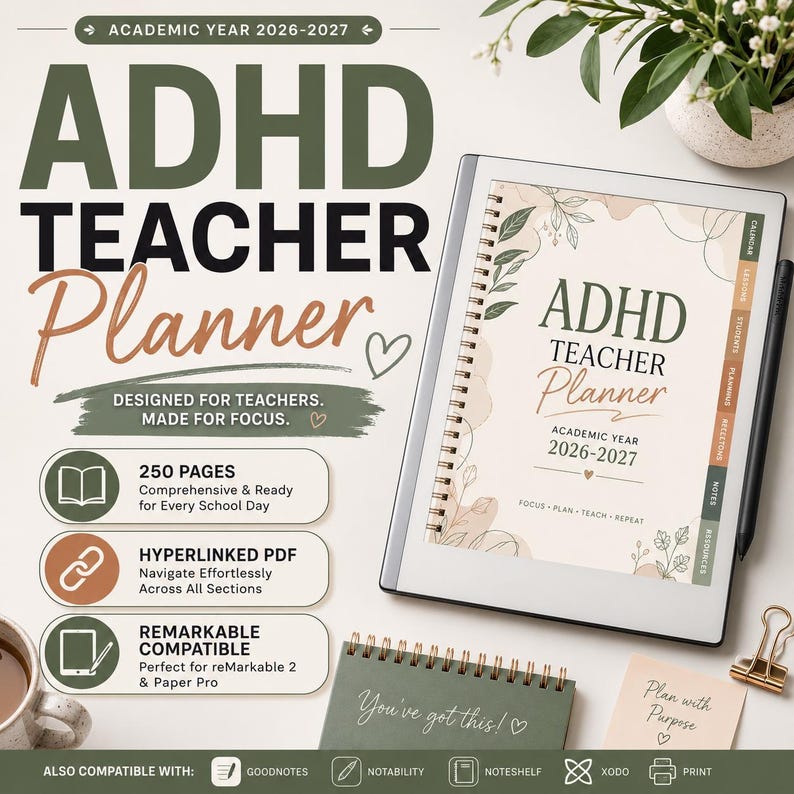
Who it is for: The ADHD Teacher Planner is for teachers who want fewer scattered notebooks and a clearer daily focus — including elementary, middle school, and high school teachers, special education teachers, homeschool educators, and student teachers, and especially teachers who prefer distraction-free planning on a reMarkable tablet. Its ADHD productivity pages, including a brain dump, priority matrix, task breakdown, Pomodoro tracker, energy tracker, weekly reset, overwhelm reset, routine builder, focus planner, reward tracker, and distraction log, are made for busy minds that need a simple place to start each day.
How to use it day by day: Start the morning on the daily planning template. Write your top priorities first, then fill in your schedule, lesson plan, and time blocking for the day, and add short student notes as you go. During lessons, use the lesson planner pages for objectives and assessments, and keep attendance, seating, and behavior notes in the classroom management pages. At the end of the day, use the daily reflection page and the weekly reflection page to close the loop: what is finished, what moves to tomorrow, and what needs a follow-up with a parent or colleague. On Fridays, run a weekly reset, review the habit tracker, check IEP goals and progress monitoring, and set the next week's priorities and meetings so Monday starts calmly.
How it keeps school life organized: Hyperlinked navigation is the key. From the clickable dashboard and hyperlinked index, you can jump straight to monthly calendars, weekly planning, daily planning, the gradebook,parent communication logss, meeting notes, and IEP pages for student profiles, goals, accommodations, services, and review dates, without flipping through 250 pages. Monthly priorities, habit tracking, and monthly reflection keep the term in view, while yearly curriculum planning, monthly and weekly lesson planners, homework logs, and grade pages for assignments, quizzes, exams, and participation keep the detail in one place. The result is one notebook for planning, teaching, grading, and communicating, instead of loose papers and half-filled notebooks.
See the ADHD Teacher Planner on Etsy here: ADHD Teacher Planner on Etsy. Watch the video below to see the ADHD Teacher Planner in action.
2. Teacher Digital Planner for reMarkable 2
The Teacher Digital Planner for reMarkable 2 is a 130-page hyperlinked PDF for 2026-2027, made for reMarkable 2 and reMarkable Paper Pro. It brings lesson planning, classroom management, grading, attendance, meeting notes, and teacher resources together in one easy-to-use notebook, with a clean, distraction-free layout and a built-in dashboard and navigation tabs so every section is easy to reach.
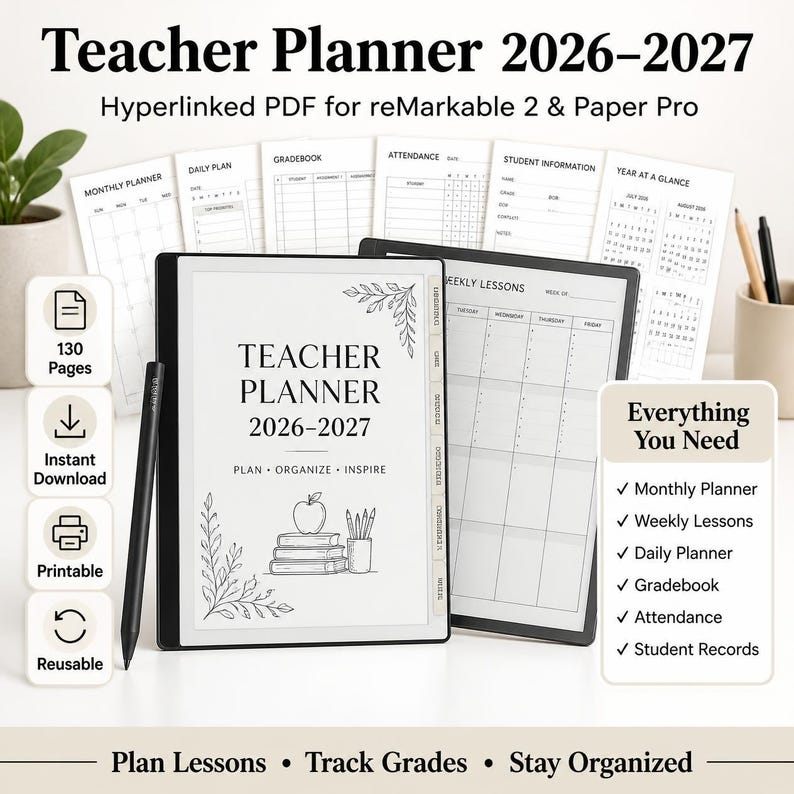
Who it is for: The Teacher Digital Planner for reMarkable 2 is for any teacher who wants a complete, straightforward digital planner for the school year — from a first-year teacher setting up routines to an experienced teacher who wants monthly planning, weekly lessons, daily planning, a gradebook, attendance, and student records in one place. It is a good fit if you like a tidy, uncluttered layout, want to reuse pages across terms, and want to plan on reMarkable 2 without carrying a heavy paper planner.
How to use it day by day: Begin with the year at a glance and the monthly planner to place term dates, deadlines, and priorities. Each week, open the weekly lessons page, set the teaching schedule and lesson focus, and note meetings and weekly priorities. Each day, use the daily planner page for the schedule, lesson notes, and small tasks, then update attendance and the gradebook as work comes in, so grades and attendance never pile up at the end of the term. Use meeting notes and parent communication pages right after a conversation, while the details are fresh, and use student information pages to keep rosters and records close at hand.
How it keeps school life organized: Everything is linked and grouped by purpose. Monthly planning shows the whole month, weekly lessons show the teaching week, and daily planning shows today — and the gradebook, attendance tracker, and student records sit alongside them, so a lesson, a grade, and a student's record are never far apart. Because it is a hyperlinked PDF, you can move from the dashboard to the section you need in a tap, reuse pages, and keep the same system all year instead of starting a new notebook each term. That consistency is what turns a busy school week into a manageable routine: plan once, check daily, and review weekly.
See the Teacher Digital Planner for reMarkable 2 on Etsy here: Teacher Digital Planner for reMarkable 2 on Etsy. Watch the video below to see the Teacher Digital Planner for reMarkable 2 in action.
Using the Two Planners Together
Together, the ADHD Teacher Planner and the Teacher Digital Planner for reMarkable 2 give teachers a choice and a backup system. Choose the ADHD Teacher Planner when focus tools, IEP tracking, and a larger 250-page system matter most, and choose the Teacher Digital Planner for reMarkable 2 when a streamlined 130-page planner for daily, weekly, and monthly teaching is the right fit. Many teachers can also use one as the main planner and the other as a focused companion for a particular class, caseload, or term. In either case, the habit is the same: start the day with priorities, keep lessons, grades, attendance, and communication in the same hyperlinked notebook, and end the week with a short review. That simple rhythm is how two well-designed planners keep school life organized, week after week, all school year.



0 Comments