
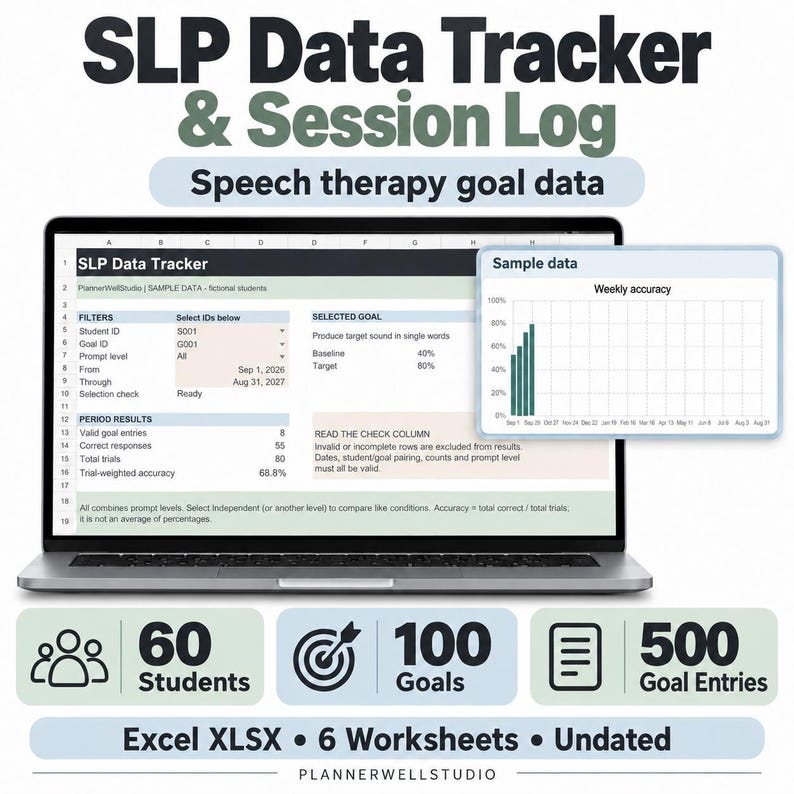
A school speech-language pathologist can see eight groups before lunch, each working on different targets, and still be expected to produce clean session notes for every one of them. That is where a speech therapy data tracker earns its place — not as another spreadsheet to maintain, but as the one place where caseload data, session notes, and deadlines meet, so nothing depends on memory at the end of a long day. Without it, notes get written from a scribbled tally sheet on Friday, a student's progress gets reconstructed instead of reported, and the quiet work of the week quietly disappears.
The problem is rarely effort. SLPs collect data all day. The problem is that the data lives in five places: tally sheets in a binder, attendance in another file, IEP dates in a calendar, progress percentages in a notebook, and session notes half-written in the car between buildings. A tracker fixes that by giving every piece one home, updated in the moment, so the note at the end of the session is a summary, not a rescue mission.
What a Speech Therapy Data Tracker Should Track
A good tracker covers four kinds of information, and nothing else needs to live in it. Keep it to these four and it stays usable all year:
- The caseload. Every student, their grade and teacher, their service minutes, their group, and their session day and time. This is the master list from my post on Speech Therapy Caseload Organization for School SLPs — one row per student, always current.
- The session data. Per student, per session: the targets worked on, trials correct out of total, and the cue level. My earlier post on speech therapy data sheets covers the plus/minus tally system that feeds these numbers.
- The session note. One short line per session, written the same day: what was targeted, how the student did, and what comes next. Not a paragraph — a record.
- The deadlines. Annual review dates, reevaluation due dates, and progress report windows, visible in one view so nothing sneaks up in a busy month.
If a tracker asks for more than this, it will be abandoned by October. If it covers less, notes will still leak out into notebooks and sticky notes. Four sections is the whole system.
The Session Routine That Keeps Notes From Slipping
The tracker only works if updating it is part of the session, not an extra job after it. This routine takes about two minutes per group:
- During the session: tally on the student's data sheet as responses happen, using the plus/minus marks and cue codes. Never reconstruct a session from memory at the end of the day.
- As the group leaves: transfer the totals into the tracker — one row per student, score, cue level, and a one-line note. Thirty seconds per student, while the session is still fresh.
- Friday, fifteen minutes: scan the week's rows. Any student with no data for the week gets flagged, any stalled target gets a note, and next week's groups get checked against assemblies and field trips.
Teachers who follow this routine say the same thing about their notes: they stop dreading them. Not because the notes got shorter, but because the data was already there when the note needed to be written.
From Tracker Rows to Progress Reports
Progress report week is where a tracker pays for itself. Without one, it means flipping through a binder, counting tallies, and guessing at trends. With one, it means reading down a student's rows and writing what they already say:
- The trend: accuracy over the last four to six weeks, not a single good or bad day.
- The support level: whether the student is moving toward independence or still needs the same cue level, because a score without its cue level is only half a result.
- The next step: continue the target, raise the level, or change the approach — decided from the data, not from a feeling about the week.
That is also what makes the tracker useful in meetings. When a parent or a team member asks how a student is doing, you are not summarizing from memory. You are reading the record, and the record is calm, specific, and dated.
Groups, Make-Ups, and the Messy Middle of the Week
Real caseloads are messy. Students are absent, groups get pulled for assemblies, and a make-up session lands on a day that already has six groups. A tracker survives this by treating the messy parts as data, not as failures:
- Mark absences in the tracker. An empty week with no explanation looks like a missed session; an absence marked as absent is honest and explainable.
- Note make-up sessions in the same row. The student's record stays chronological, and service minutes stay countable.
- Keep one row per session, even a short one. A ten-minute check-in is still a session, and its data still counts toward the trend.
The clinicians whose records hold up under review are not the ones with perfect weeks. They are the ones whose tracker shows exactly what happened, including the weeks that did not go to plan.
Paper Sheets and a Spreadsheet, Working Together
This system does not ask you to choose between paper and digital. Paper data sheets are still the fastest way to tally during a session, when your hands and attention belong to the activity. The spreadsheet is where those tallies go to live — searchable, sortable, and ready to turn into a report. Paper captures, the tracker keeps. Neither job belongs to the other tool, and together they cover the whole week.
Start with one group. Set up its rows, run the two-minute transfer routine for a week, and watch what happens to your notes: they get shorter, more accurate, and finished on the day they belong to. Then add the rest of the caseload, one group at a time, until no student's progress depends on your memory alone.
Ready-to-use help: If you want the caseload tracker, session data sheets, and progress summaries laid out and ready to use, the SLP Data Tracker Spreadsheet was built for exactly this system — one clear record per student, per session, so notes, data, and deadlines stay in the same place.
Browse all teacher planners here: https://www.etsy.com/shop/PlannerWellStudio
Start with today. Take the groups you already saw this morning, enter their scores and one-line notes, and let the tracker carry the rest of the week.
Read next
SLP Data Tracker: A Spreadsheet That Saves Session Time
IEP Progress Reports: Collect Data All Quarter So Report Week Is Easy



0 Comments