
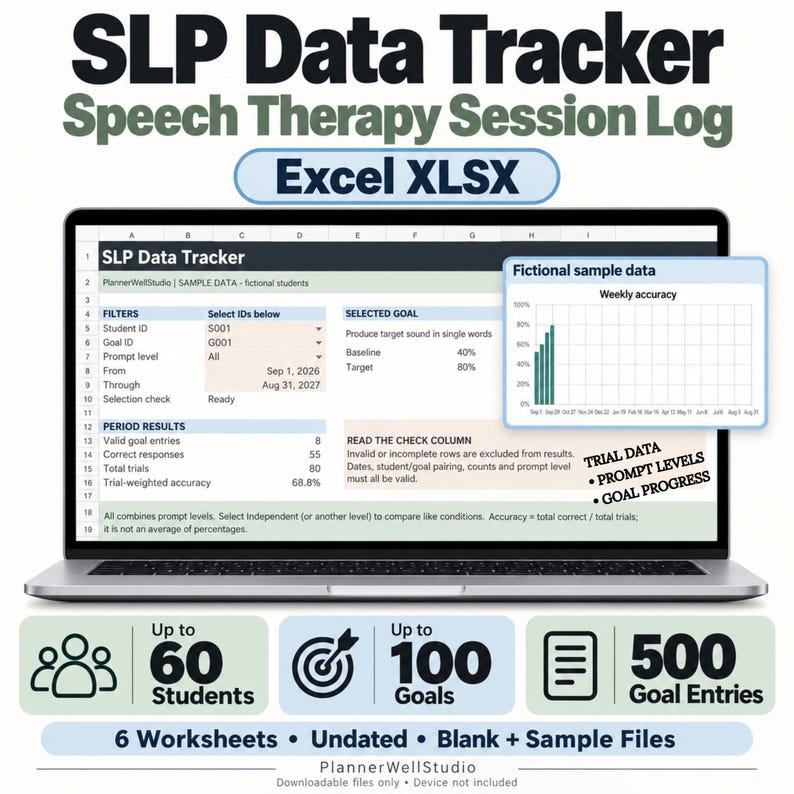
A school speech-language pathologist's session time is the scarcest resource in the building. The session itself is only twenty or thirty minutes, and the students are in front of you for most of it. What eats the rest of the day is everything around the session: finding last week's scores, working out whether a student is actually improving, writing the note, and then, weeks later, rebuilding the whole picture for a progress report. An slp data tracker does not give you more session time. It stops the paperwork around the session from taking the time you already have.
The difference between a spreadsheet that helps and a spreadsheet that becomes another chore is design. A good slp data tracker is built around the way an SLP actually works: one student at a time, one target at a time, a handful of trials, a prompt level, and a result. When the sheet matches that rhythm, entering data takes seconds. When it does not, the sheet gets abandoned by October and the data goes back to sticky notes.
How an SLP Data Tracker Saves Time During the Session
The first saving happens before the session even starts. Open the tracker, filter to today's group, and you can see each student's current targets, their last scores, and the prompt level they were working at. You walk into the room already knowing what to practise, instead of spending the first five minutes remembering where each student left off.
During the session, the tracker asks for only what matters: the date, the student, the target, trials correct out of trials attempted, and the prompt level. That is the whole entry. A student who produced a sound correctly eight times out of ten with a visual cue becomes one row: 8/10, visual cue. There is no paragraph to write, no form to fill in, and nothing to reconstruct later, because the number was entered while it was still true.
The second saving is the prompt level column, and it is the one most SLPs underestimate. A score on its own is only half a result. Eight out of ten with a full model is a different outcome from eight out of ten independently, and a progress report that cannot tell the difference is not much use to anyone. Recording the prompt level next to every score means the trend you read later is honest: you can see a student holding the same accuracy while needing less and less help, which is real progress even when the raw score barely moves.
From Trial Data to a Trend You Can Read at a Glance
Raw rows are useful, but a tracker earns its keep when it turns those rows into a picture. A weekly accuracy chart per student, built from the scores you already entered, shows the trend without any extra work: is this target climbing, flat, or slipping? A flat line over four weeks is a decision waiting to be made — change the approach, adjust the target, or check whether the sessions are actually happening as scheduled. Without the chart, that flat line hides inside a pile of tally sheets until progress report week, when it is too late to act on it.
Goal progress works the same way. When each target is tied to a student's goal, the tracker can show, per goal, how the recent sessions are trending. That is what turns a progress report from a writing task into a reading task. Instead of counting tallies and guessing at trends, you read down the student's rows, note the accuracy over the last four to six weeks, note the prompt level, and write what the data already says. The note gets shorter, more accurate, and finished on the day it belongs to.
Filters do the quiet work here. Filter by student for a parent meeting. Filter by goal for an IEP review. Filter by week to check whether every student on the caseload actually got their sessions in a week disrupted by assemblies and absences. A spreadsheet that can answer those three questions in under a minute is doing the job of a filing cabinet, a calculator, and a calendar at once.
The Two-Minute Transfer Routine
A tracker only saves time if updating it is part of the session, not an extra job after it. This routine takes about two minutes per group:
- During the session: tally on paper if that is fastest, using plus and minus marks and cue codes, while your attention stays on the student.
- As the group leaves: transfer the totals into the tracker — one row per student, score, prompt level, and a one-line note. Thirty seconds per student, while the session is still fresh.
- Friday, fifteen minutes: scan the week's rows. Any student with no data gets flagged, any stalled target gets a note, and next week's groups get checked against assemblies, field trips, and testing days.
That Friday scan is where the time saving compounds. Catching a missed session on Friday means a make-up can be booked next week. Catching it at progress report time means explaining a gap. The same fifteen minutes that keeps the tracker current also keeps the caseload honest: absences marked as absences, make-up sessions recorded in the same chronological row, short check-ins counted as the sessions they are. A record that shows exactly what happened, including the messy weeks, holds up far better than a perfect-looking record with holes in it.
Paper Sheets and a Spreadsheet, Each Doing Its Own Job
This system does not ask you to choose between paper and digital, because each tool is better at a different part of the job. Paper data sheets are still the fastest way to tally during a session, when your hands and attention belong to the activity. The spreadsheet is where those tallies go to live — searchable, sortable, and ready to turn into a chart or a report. Paper captures, the tracker keeps. Trying to make one tool do both jobs is how SLPs end up with a binder nobody can search and a spreadsheet nobody updates.
Start with one group. Set up its rows, run the two-minute transfer routine for a week, and watch what happens to your notes and your planning: the next session starts with the last session's data already in front of you, and the progress report starts writing itself from rows you entered weeks ago. Then add the rest of the caseload, one group at a time, until no student's progress depends on your memory alone.
An slp data tracker saves session time not by being clever, but by being faithful: every trial counted once, every prompt level recorded, every week visible. The time it saves is not dramatic — a few minutes here, a frantic evening there. Added up over a school year, it is the difference between an SLP who spends evenings reconstructing data and one who leaves school with the notes already done.
Ready-to-use help: If you want the tracker ready to use — trial data entry, prompt levels, goal progress tracking, and weekly accuracy charts in one spreadsheet — the SLP Data Tracker Spreadsheet was built for exactly this routine: one clear record per student, per session, so session time stays with the students and the paperwork takes care of itself.
Browse all teacher planners here: https://www.etsy.com/shop/PlannerWellStudio



0 Comments