
The School Counselor Planner and the Teacher Gradebook for reMarkable 2 and Paper Pro were made for two different jobs in the same school, and that is exactly why they work so well together. One keeps students, sessions, referrals, and follow-ups in one calm place. The other keeps grades, attendance, and class records in one clear place. Used on their own, each planner saves time and reduces the small, repeated decisions that make a school day feel scattered. Used together, they give a counselor and a teacher a shared way of working: what happened, what was agreed, what comes next, and what still needs attention.
This guide looks at both planners side by side. You will learn who each planner is for, how to use it day by day, and how it keeps school life organized without adding another complicated routine. The aim is not a perfect planner. The aim is a planner you actually open, trust, and return to, morning after morning, because it answers the question you are asking in that moment.
Both planners are digital, hyperlinked PDFs, so they are made to be used on a tablet with a stylus, or printed when paper works better. You can move between sections with a tap instead of flipping through a binder, find a student or a class quickly, and keep the information you need close at hand. That matters in a school, where a question rarely arrives when you are sitting at a desk with time to search. It arrives in a corridor, between lessons, before a meeting, or at the end of a busy day when you want to close the loop and go home.
1. School Counselor Planner: One Calm Place for Students, Sessions, and Follow-Ups
Who it is for
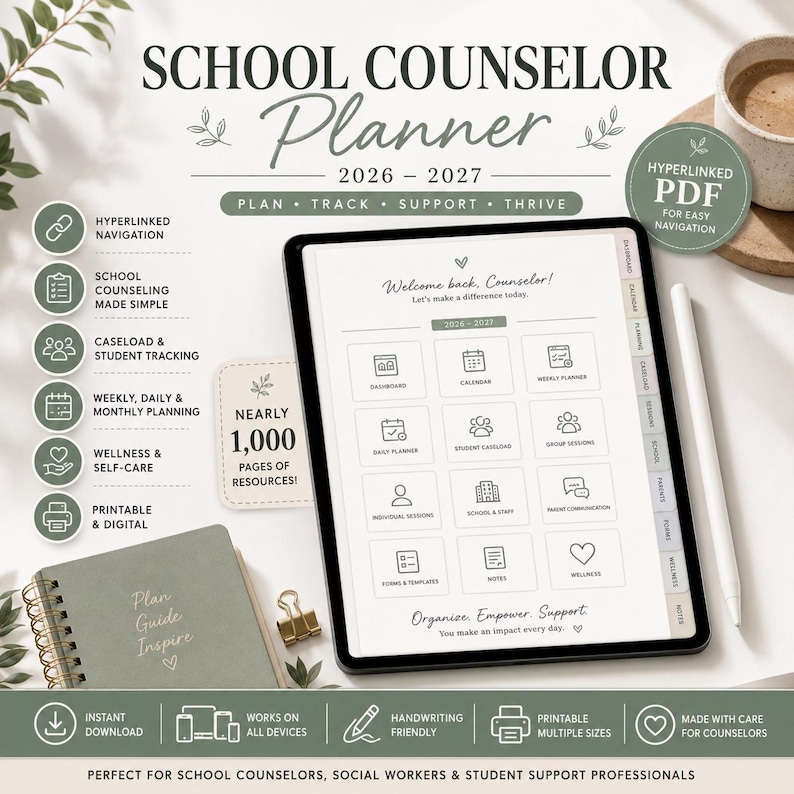
The School Counselor Planner is for school counselors who carry a wide, varied caseload and need to hold many kinds of information at once. It is for the counselor who starts the day with individual sessions, moves into a small group, answers a teacher question about a student, checks a referral, and then prepares for a parent meeting, all before lunch. It is also for counselors who support students across year groups, work with families and outside services, and need a record that is both practical and respectful of sensitive information.
If your work often feels like a set of loose ends, this planner is designed for that feeling. A student mention in passing, a note to check in next week, a form that still needs a signature, a meeting that needs a short summary: each of these is small on its own, but together they can fill a working memory that is already full. The planner gives each item a home, so you do not have to keep everything in your head, in a notebook margin, or in a pile of sticky notes that may not survive the week.
It is also a good fit for counselors who like a visual, tap-to-move system. Because it is a hyperlinked PDF, you can jump from a dashboard or calendar view to the page you need, rather than searching through a long file. That speed is not a luxury in counseling work. It is what lets you stay present with a student, then find the right page in seconds when you need to record what happened or plan the next step.
How to use it day by day
Start each morning by opening the planner to the day ahead, not to everything at once. Look at your sessions, groups, meetings, and any follow-ups carried over from yesterday. Choose the two or three contacts that matter most that day, and note them where you will see them. A short morning check like this takes only a few minutes, but it changes the shape of the day: instead of reacting to each request as it arrives, you begin with a clear sense of who you will see and what you still owe them.
During the day, use the planner as a working record rather than a perfect diary. After a session, write the brief facts you will need later: the date, the student, the main focus, any agreed next step, and the date to check back. Keep notes short, factual, and useful to your future self. If a referral is made, record who it was sent to and when. If a parent or teacher conversation happens, note the key points and any promise you made, so you can follow through without relying on memory alone.
Between sessions, the planner can hold the small administrative tasks that are easy to lose: a form to complete, a permission to chase, a resource to send, or a check-in that was postponed. Put each task in the same place, with a date beside it, and review that list once in the afternoon. That afternoon review is where the planner earns its keep. It turns a day of conversations into a short list of closed loops and open items, and it stops tomorrow from starting with yesterday's unfinished business.
At the end of the week, spend ten to fifteen minutes looking back across your caseload. Who have you seen? Who has not been seen for a while? Which referrals are still waiting? Which students need a gentle check-in next week, even if nothing urgent has happened? This weekly review is not about adding work. It is about noticing patterns early, before a small concern becomes a larger one, and about making sure no student quietly drops off your radar because the week was busy.
How it keeps school life organized
The School Counselor Planner keeps school life organized by bringing student management, planning, and follow-up into one system. Instead of keeping session notes in one place, referrals in another, and calendar dates somewhere else, you can move between them in the same planner. That single system reduces the risk of a missed follow-up, a duplicated conversation, or a meeting where you cannot quickly find the background you need.
It also helps you protect time and attention. When the next step for each student is written down, you do not have to rethink the whole caseload every time you sit down to work. You can open the planner, see the next action, and do it. Over a term, that habit builds trust with students, families, and colleagues, because people experience a counselor who remembers, follows up, and closes the loop. Organization, in this sense, is not about tidy pages. It is about reliable care.
Watch the video above to see the School Counselor Planner in use, and notice how the hyperlinked pages make it easy to move from planning to student records and back again. A planner that is easy to move through is a planner you will use on a busy day, not only on a quiet one.
See the School Counselor Planner on Etsy
2. Teacher Gradebook for reMarkable 2 and Paper Pro: Grades, Attendance, and Class Records in One Place
Who it is for
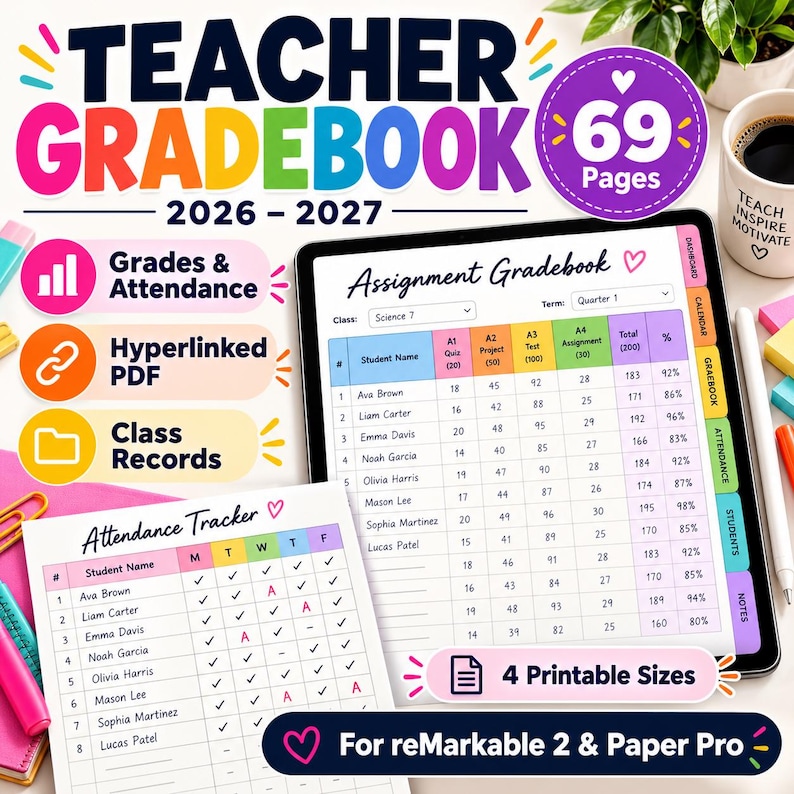
The Teacher Gradebook for reMarkable 2 and Paper Pro is for teachers who want grades and attendance to live together, in a format made for the reMarkable 2 and reMarkable Paper Pro. It is for the teacher who marks assignments, quizzes, and classwork across several classes, tracks attendance day by day, and still needs to answer a simple question quickly: how is this student doing, and what is missing? It is also for teachers who prefer writing by hand on an e-ink device, without the distraction of a full tablet, but who still want the speed of hyperlinks and a clear layout.
This gradebook is especially helpful if you teach more than one class, more than one year group, or a subject where small marks add up over time. When each class has its own space, and each student has a clear row for assignments and attendance, you do not have to rebuild your system every term. You open the gradebook, find the class, and work from the same structure week after week. That consistency helps students too, because expectations and records stay steady even when the school week does not.
It is also a strong choice for teachers who need both digital and paper options. The gradebook is designed as a hyperlinked PDF for reMarkable devices, and the cover highlights four printable sizes, so you can use it on screen, print the pages you need, or use a mix of both. A teacher who marks on the device in class and prints a page for a meeting, for example, does not need two different systems. The same gradebook can serve both moments.
How to use it day by day
Begin by setting up each class once, with student names in a consistent order and columns for the assignments, quizzes, and assessments you expect during the term. Keep the column headings short and clear, so a quick glance tells you what each mark means. If you use the same order for attendance and grades, you will find a student faster, and you will be less likely to enter a mark in the wrong row when you are working quickly after a lesson.
Each school day, start with attendance. Mark it in the same place, at the same time, so it becomes a habit rather than a task you remember at the end of the day. A reliable attendance record is more than a register. Over time, it shows patterns: a student who is often late on a certain day, a run of absences that may need a check-in, or a class where attendance dips after a holiday. When attendance and grades sit side by side, those patterns are easier to see, and easier to act on early.
When work comes in, record marks promptly, even if you only enter the score and a short note. Do not wait until the end of the week to enter a whole pile of work, because that is when errors creep in and missing work becomes harder to chase. A short daily habit, entering marks as you mark, keeps the gradebook current and makes report time far less stressful. If a student asks about a missing assignment, you can check the gradebook and give a clear answer, instead of searching through papers or messages.
At the end of each week, take a few minutes to scan each class. Who has missing work? Who has improved? Who needs a reminder, a second chance, or a short conversation? Write those follow-ups in the same place you will see them next week. At the end of a term, the gradebook then becomes a record you can trust, because it was built day by day, not reconstructed from memory when reports were due.
How it keeps school life organized
The Teacher Gradebook for reMarkable 2 and Paper Pro keeps school life organized by keeping the numbers that matter in one structured place. Grades, attendance, and class records are not scattered across notebooks, spreadsheets, and loose sheets. They are in a 69-page gradebook with a clear layout for assignments, attendance tracking, and class records, so a teacher can move from a daily mark to a term view without starting over.
That structure also supports fair, calm conversations with students and families. When a question about a grade or an absence arises, the teacher can show the record, explain the pattern, and agree on the next step. There is less guessing, less searching, and less stress for everyone. Organization here is not about collecting more data. It is about keeping the data you already collect in a place where it can actually help a student.
Watch the video above to see the Teacher Gradebook for reMarkable 2 and Paper Pro in action, and notice how the assignment gradebook and attendance tracker sit together on a clear, handwriting-friendly layout. A gradebook that is easy to read at a glance is easier to keep up to date, and a gradebook that is up to date is easier to trust.
See the Teacher Gradebook for reMarkable 2 and Paper Pro on Etsy
Using Them Together: A Counselor and a Teacher, Working From the Same Picture
Used together, the School Counselor Planner and the Teacher Gradebook for reMarkable 2 and Paper Pro give a school a simple, practical partnership. The counselor holds the story behind a student: sessions, support, referrals, and follow-ups. The teacher holds the classroom picture: attendance, assignments, and progress over time. Neither planner tries to do the other job, and that is the point. Each one stays focused, and together they help adults notice the same student from two useful angles.
In practice, that partnership can be very ordinary, and very helpful. A teacher may notice a change in attendance or missing work in the gradebook and pass that observation to the counselor. The counselor may already have a follow-up planned, or may arrange a check-in, and can record the next step in the planner. Later, the teacher can see whether attendance or work has steadied, without needing a long meeting or a chain of messages to find out. Small, timely observations, recorded in the right place, often help more than a large intervention later.
For a single educator who does both kinds of work, or for a small school team, using both planners also creates a shared rhythm. Start the day with the students who need attention, keep grades and attendance current, review follow-ups in the afternoon, and look back once a week. That rhythm does not remove the busyness of school life, but it does remove some of the background worry: the feeling that something important has been forgotten, or that a record cannot be found when it is needed.
If you are choosing one planner to start with, choose the job that causes you the most friction right now. If follow-ups and student records are slipping, start with the School Counselor Planner. If grades and attendance feel scattered, start with the Teacher Gradebook for reMarkable 2 and Paper Pro. If both feel scattered, start with one, build the habit for two weeks, and then add the second. A calm system grows one reliable habit at a time, and these two planners are made to grow in exactly that way.



0 Comments